Geometry Dash Lite














What Is Geometry Dash Lite?
Geometry Dash Lite is a complimentary, browser-based rhythm platformer crafted by Robert Topala (widely known as RobTop) and released by his studio, RobTop Games. It initially launched on August 13, 2013, for iOS and Android. Today, it is fully playable on Geometry Dash via HTML5—meaning zero downloads, no installations, and completely unblocked. Acting as the free, ad-supported edition of the full Geometry Dash experience, it grants access to 19 official levels as of Update 2.215.
Players maneuver a geometric icon that automatically scrolls through hazardous courses packed with spikes, saws, and portals, with every single action perfectly synced to an energetic electronic soundtrack. Miss a beat or clip an obstacle, and you are instantly sent back to 0%. There are no checkpoints in Normal Mode and absolutely no shortcuts—just pure rhythm, rapid reflexes, and the urge for one more try. While it doesn't have the level editor or the massive level count of the premium version, Geometry Dash Lite retains the exact same beat-based mechanics. Furthermore, any progress and custom icons you unlock in Lite will seamlessly transfer if you decide to upgrade to the full game.
How to Play Geometry Dash Lite?
Mastering Geometry Dash Lite requires learning simple controls that demand incredibly precise timing. If you are on a desktop, you can press the Spacebar, the Up Arrow key, or use a Left Mouse Click to jump. For mobile users, simply tapping the screen does the trick. It is a single-input system, but executing that input in perfect harmony with the beat synchronization of each level is the true challenge.
Basic Controls| Action | PC | Mobile |
|---|---|---|
| Jump (Cube) | Spacebar / Up Arrow / Left Click | Tap screen |
| Fly (Ship mode) | Hold Spacebar | Hold tap |
| Wave mode | Hold = move up, Release = move down | Hold/release tap |
| Pause | P key | Pause button |
| Restart level | Backspace | Restart button |
Normal Mode vs Practice Mode
Geometry Dash has two distinct ways to experience a level. Understanding how to utilize both is vital for making actual progress.
Normal Mode serves as the classic run. Your icon auto-scrolls from beginning to end, with a percentage tracker displaying your live progress. There are zero checkpoints—a single collision with a spike, saw, gravity portal, or speed portal instantly sends you back to 0%. Finishing a level in Normal Mode is the sole way to mark it as complete.
Practice Mode permits you to drop manual checkpoints by hitting the Z key at any stage in a level. If you crash, you instantly respawn from your last checkpoint rather than going back to 0%. Leverage Practice Mode to memorize tricky segments before trying a full Normal Mode run. If you experience input lag during browser play, turning on Hardware Acceleration in your browser settings will heavily smooth out the gameplay.
All 19 Geometry Dash Lite Levels
As of Update 2.215, Geometry Dash Lite boasts 19 official levels. Every level hides 3 secret coins along dangerous alternate paths. Only attempt to gather all three once you can comfortably beat the level—don't try it on your first few runs. The difficulty steadily ramps up from Easy all the way to Demon, with Clubstep and Geometrical Dominator standing out as the most brutal challenges in the free version.
| # | Level Name | Difficulty | Secret Coins | Music Artist |
|---|---|---|---|---|
| 1 | Stereo Madness | Easy | 3 | ForeverBound |
| 2 | Back on Track | Easy | 3 | DJVI |
| 3 | Polargeist | Normal | 3 | Step |
| 4 | Dry Out | Normal | 3 | DJVI |
| 5 | Base After Base | Normal | 3 | DJVI |
| 6 | Cant Let Go | Normal | 3 | DJVI |
| 7 | Jumper | Hard | 3 | Waterflame |
| 8 | Time Machine | Hard | 3 | Waterflame |
| 9 | Cycles | Hard | 3 | DJVI |
| 10 | xStep | Hard | 3 | DJVI |
| 11 | Clutterfunk | Hard | 3 | Waterflame |
| 12 | Theory of Everything | Hard | 3 | DJ-Nate |
| 13 | Electroman Adventures | Harder | 3 | Waterflame |
| 14 | Clubstep | Demon | 3 | DJ-Nate |
| 15 | Electrodynamix | Harder | 3 | DJ-Nate |
| 16 | Hexagon Force | Harder | 3 | Waterflame |
| 17 | Blast Processing | Harder | 3 | Waterflame |
| 18 | Theory of Everything 2 | Insane | 3 | DJ-Nate |
| 19 | Geometrical Dominator | Harder | 3 | Waterflame |
Stereo Madness and Back on Track act as the perfect entry points, featuring simple cube sections that teach the fundamental jump timing. When you hit Clubstep at level 14, the Demon difficulty brings in complex ship sequences and multi-layered obstacles that force you to memorize the entire level rather than relying on reflexes alone. Geometrical Dominator, the 19th level, is arguably the most technically grueling stage in GD Lite, throwing constant form switches and claustrophobic corridors that heavily punish even the slightest timing mistake.
How Many Icon Forms Are in Geometry Dash Lite?
In the Lite version, there are 7 playable icon forms. You cannot manually swap between them mid-level—form transitions are automatically triggered by gravity portals and specific portal triggers woven into the design. Every single form comes with its own unique hitbox, movement physics, and timing demands. Becoming proficient in all seven is mandatory for conquering the later, more punishing stages.
| Icon Form | How It Moves | Key Mechanic | Appears From |
|---|---|---|---|
| Cube | Single tap to jump | Basic jump timing, variable height on hold | Level 1 |
| Ship | Hold to fly up, release to descend | Momentum control, avoid ceiling and floor | Level 1 |
| Ball | Tap to flip gravity | Alternates between floor and ceiling | Level 4 |
| UFO | Tap to boost upward | Short bursts, drops between taps | Level 6 |
| Wave | Hold = diagonal up, release = diagonal down | Constant fluid motion, no stopping | Level 8 |
| Robot | Hold duration controls jump height | Precision tap timing for low or high jumps | Level 11 |
| Spider | Tap to teleport to opposite surface | Instant gravity flip, no arc | Level 16 |
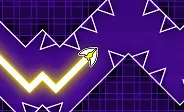
Every new form adds a fresh layer of required reaction time and muscle memory. The Wave presents the steepest learning curve for beginners; unlike the Cube, where you can tap and adjust on the fly, the Wave harshly penalizes any hesitation in your hold-and-release timing. The Ship demands keen awareness of momentum, especially in tight corridors where holding too long sends you crashing into the ceiling. Additionally, Size portals can spawn a mini variant of any icon, which shrinks your hitbox but makes it notably tougher to track your character visually.
How Does Geometry Dash Lite Compare to Other Versions?
All four complimentary versions of Geometry Dash are crafted by RobTop Games and share identical core rhythm-platformer DNA, yet each delivers a distinct experience. Here’s a look at how Geometry Dash Lite stacks up against the rest.
| Feature | GD Lite | GD Full | GD World | GD SubZero | GD Meltdown |
|---|---|---|---|---|---|
| Price | Free | $1.99 | Free | Free | Free |
| Levels | 19 | 21+ unlimited | 4 | 3 | 3 |
| Level Editor | No | Yes | No | No | No |
| User Generated Levels | No | Yes | No | No | No |
| Ads | Yes | No | Yes | No | No |
| Daily Rewards | No | No | Yes | No | No |
| Progress Transfer to Full | Yes | - | No | No | No |
| Icon Customization | Yes | Full | Limited | Limited | Limited |
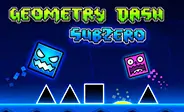
Geometry Dash World is built around short levels, offering daily rewards and shop unlockables—perfect for quick gaming sessions. Geometry Dash SubZero brings advanced camera angles and reverse gameplay mechanics that aren't present in Lite. Geometry Dash Meltdown boasts three visually intense levels with accelerated physics and shifting objects. The premium paid version completely strips away ads, grants access to the level editor, and opens the door to millions of user-generated levels, including the legendary community Demon List.
Ultimately, the GD Lite version is the ideal starting point for anyone just stepping into the Geometry Dash universe. Any custom icons and progress you grind out in the free version will carry over instantly should you choose to upgrade to the full game with a one-time purchase.
FAQs
Yes, Geometry Dash Lite is entirely free to play. The browser edition hosted on Geometry Dash operates via HTML5, requiring no downloads, sign-ups, or fees. The game is supported by ads, meaning brief commercials might pop up between attempts, but they never interfere with live gameplay.
Geometrical Dominator, the 19th level, is widely regarded as the most technically grueling stage in the game. However, Clubstep at level 14 holds the official Demon difficulty rating, making it the only Demon-tier level in the free version. Beating both requires full memorization of the layout rather than just relying on quick reflexes.
Yes, absolutely. This version of Geometry Dash runs completely in your browser via HTML5, meaning no app installs or downloads are needed. It works flawlessly on school Chromebooks, MacBooks, and even on strictly restricted networks without setting off content filters. Just load the page and jump right in.
Yes, the game operates smoothly on mobile browsers across both Android and iOS platforms thanks to HTML5. Touch controls replace keyboard inputs—just tap the screen to jump and hold down to fly in Ship mode. You do not need to download any app from the App Store or Google Play to enjoy it on Geometry Dash.