Geometry Dash Black Line







About Geometry Dash Black Line
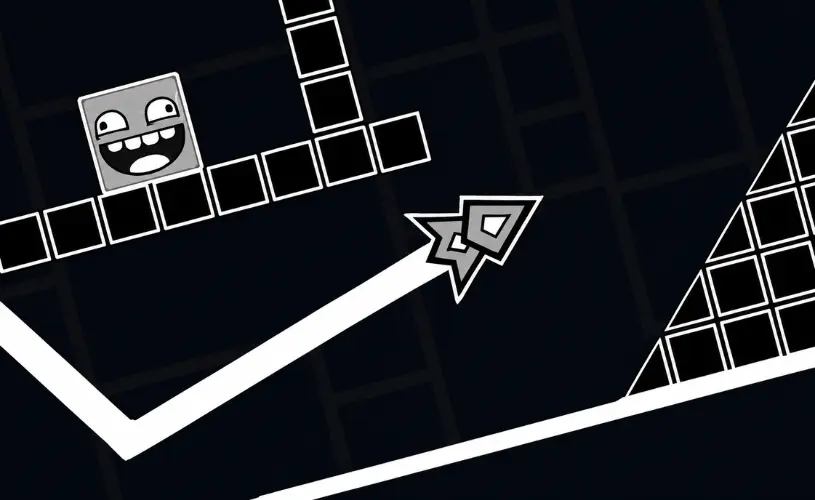
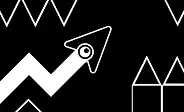
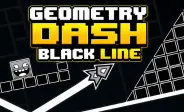
Geometry Dash Black Line is a free-to-play minimalist browser arcade game that strips the rhythm-platformer formula down to its raw essentials. Inspired by the iconic Geometry Dash franchise created by Robert Topala and RobTop Games in 2013, Black Line replaces the neon visuals with a stark monochromatic aesthetic — black background, white hazards, single geometric icon. The result is a pure reflex test where every spike, gap, and wall is razor-sharp and impossible to miss.
The game runs entirely in your browser on GeoDash with no downloads, installs, or sign-ups. One-button controls, instant respawns, and an unforgiving difficulty curve make it a favourite for veteran players who want a no-frills challenge that rewards pure muscle memory.

How to Play Geometry Dash Black Line
The controls take seconds to learn but the timing takes hours to master. The entire game runs on a single input — your icon auto-scrolls forward and your only job is to decide when to jump.
- Desktop: Press the Spacebar or click the left mouse button to jump.
- Mobile: Tap anywhere on the screen to jump.
- Hold for vehicle modes: In ship, UFO, or wave sections, hold the input to fly or ascend, and release to descend.
Touching any spike, wall, ceiling, or floor instantly restarts the level. A progress bar at the top tracks your run from 0% to 100%. Reaching the end portal completes the stage.
Practice mode is available and highly recommended for new players. It lets you drop manual checkpoints so you can memorise tricky sections without restarting from the beginning every time.
What Makes Black Line Different?
Most Geometry Dash spin-offs lean into flashy effects, rotating cameras, and rainbow particle bursts. Black Line goes the opposite direction. The monochromatic palette is a deliberate design choice that does three things:
- Forces focus on hitboxes. With no visual noise, you see exactly where each spike starts and ends. There is nothing to misread.
- Removes rhythm-synced distractions. The original GD uses pulsing backgrounds synced to the soundtrack. Black Line keeps the audio but strips the visual sync, so your timing comes from the beat, not the screen flash.
- Heightens difficulty perception. A simple black-and-white level feels harder than an identically laid-out neon level because the brain reads minimalism as "precise". This psychological trick makes every clear feel earned.
If you have played the official Geometry Dash and want a stripped-down pure-skill variant, Black Line is the closest thing to a "dark mode" training ground for the franchise.
Black Line vs Other Geometry Dash Spin-offs
Not sure which spin-off to pick? Here is how Black Line compares to the other popular titles on GeoDash:
| Game | Visual style | Difficulty | Best for |
|---|---|---|---|
| Black Line | Monochromatic minimalist | Ultra-hard | Veterans, pure-skill runs |
| Geometry Dash Lite | Neon, full color | Beginner-friendly | New players learning mechanics |
| Geometry Dash Meltdown | Lava-themed, fiery | Medium | Players who want music-driven runs |
| Geometry Arrow | Cave-like, dark | Wave-focused | Wave-mode training |
| Dart 2.2 Challenge | Modern, polished | Scales Easy → Demon | Players wanting progression |
All five titles are free to play in-browser on GeoDash with no downloads required.
Common Mistakes New Players Make
Most early deaths in Black Line come from a handful of fixable habits. Spot these and your clear rate climbs fast:
- Reacting instead of memorising. Because the level layout is static, every death should teach you a specific obstacle. Treat each crash as a data point, not a failure.
- Jumping too early on triple-spike patterns. The instinct is to jump the moment you see spikes, but the correct timing is when your icon is one body-length away. Jumping early clips the second spike.
- Skipping Practice Mode. Practice mode feels like cheating to new players, but it is the only way to learn ship and wave sections without spending 50 attempts on the same 5-second segment.
- Ignoring the audio. The soundtrack is not just decoration — obstacle placement is synced to the beat. Muting the game removes a free timing aid.
- Playing on a slow browser tab. Close other tabs and disable heavy extensions. Input latency on a slow tab is the difference between a clean jump and a clip.
Key Features
Minimalist monochromatic design
A stark black-and-white aesthetic that removes every distraction, keeping your eyes locked on the obstacles and the gameplay.
Ultra-hard difficulty
Tailored for veteran players and hardcore fans. Every jump demands pinpoint accuracy and flawless timing — no hand-holding.
Smooth one-button controls
Responsive inputs that ensure every crash is your timing, not the game's fault. Works identically on mouse, keyboard, and touch.
Practice mode with checkpoints
Drop manual checkpoints to learn tricky sections without restarting from the beginning. The fastest way to internalise the layout.
Instant browser play
No downloads, no installs, no sign-ups. Click Play and the game loads in your current tab on desktop or mobile.
Pro Tips to Beat Black Line
Once you hit the harder sections, raw reaction speed stops being enough. These strategies separate players who clear the level from players stuck at 60%:
- Learn the layout in chunks. Break the level into 5-10 second segments mentally. Master each segment in Practice Mode before chaining them in a real run.
- Watch the progress bar. The bar tells you how far you have come. If you keep dying at the same percentage, that is the segment to drill in Practice Mode.
- Tap lightly on mobile. A hard tap does not jump higher — it just tires your finger faster. Use the lightest possible touch.
- Sync with the beat, not the visuals. The audio tells you when hazards are coming a fraction of a second before they appear on screen.
- Take breaks after 20 attempts. Tilted runs create sloppy inputs. A 2-minute pause resets your rhythm more than 10 minutes of frustrated retrying.
About This Game
Geometry Dash Black Line is an independent, community-driven browser adaptation inspired by the Geometry Dash franchise. Geometry Dash and all related marks are the property of RobTop Games and Robert Topala. GeoDash is not affiliated with, endorsed by, or sponsored by RobTop Games. For the official experience, try Geometry Dash Lite, Geometry Dash World, and Geometry Dash Subzero on our platform.
Frequently Asked Questions
Yes. Geometry Dash Black Line runs directly in your browser on GeoDash with no downloads, installs, or sign-ups. Just click Play and the game loads in your current tab.
Black Line is built as an ultra-hard challenge aimed at veteran players. The minimalist visuals remove distractions but the obstacle placement demands pinpoint timing, making it noticeably tougher than the early official levels.
Yes. Practice mode lets you drop checkpoints and memorise the level layout without restarting from the beginning. It is the fastest way to learn the tricky sections before attempting a clean run.
No. Geometry Dash Black Line is an independent, community-driven browser adaptation. Geometry Dash and all related marks belong to RobTop Games and Robert Topala. GeoDash is not affiliated with or endorsed by RobTop Games.